# Master the art of React.useEffect
When I started learning React, I made a few mistakes with the way I was using `React.useEffect`, especially managing the dependencies. My effects kept on running when I didn't want them to run, causing strange bugs in my apps. So today I would like to share with you a few things I learned along the way about this hook. Hopefully, it will help clear things out for you.
## `React.useEffect`, a lifecycle hook ?
⛔️ **NOPE**, it is not !
Developers often misunderstand `useEffect` as a lifecycle hook, coming from class components where we had things like `componentDidMount` or `componentWillUnmount`. While we can achieve similar behavior with `useEffect`, it is not correct to say that this hook represents a certain time in the lifecycle of a component.
In fact, `useEffect` is nothing but **a mechanism for synchronizing side effects with the state of your app**. This means that the code you place inside this hook will only run **if a certain state of your app changes**.
To quote [Ryan Florence](https://twitter.com/ryanflorence/status/1125041041063665666):
> The question is not "when does this effect run" the question is "with which state does this effect synchronize with"
Nothing better than a simple example to understand this:
```js
function HelloWorld() {
const [greeting, setGreeting] = React.useState("Hello")
const [subject, setSubject] = React.useState("World")
// You can ignore this, it's just a trick to trigger a re-render on demand
const [_, reRender] = React.useState()
// useEffect #1
React.useEffect(() => {
console.log(
'SOMETHING changed in "HelloWorld" component, or "HelloWorld" re-rendered'
)
}) // <- no dependencies !
// useEffect #2
React.useEffect(() => {
console.log("I will only log once, as I synchronize with NOTHING")
}, []) // <- empty array as dependencies
// useEffect #3
React.useEffect(() => {
console.log("greeting AND/OR subject changed")
}, [greeting, subject]) // <- greeting and subject as dependencies
return (
setGreeting(event.target.value)}
/>
setSubject(event.target.value)}
/>
{greeting} {subject}
)
}
```
🔗 [Here is a link to the code sandbox](https://codesandbox.io/s/use-effect-demo-6er4m?file=/src/App.js:1384-1449)
In this `` component, we have 3 `useEffect` that will synchronize with different state changes:
1. `useEffect` #1 ⇒ has no dependencies, so everytime the component gets re-rendered (meaning **something** changed), the code inside this useEffect will be executed
2. `useEffect` #2 ⇒ has an empty array as dependencies, so it synchronizes with nothing, meaning it will be run only once, after the first time the component is rendered
3. `useEffect` #3 ⇒ has `subject` and `greeting` as dependencies, so it synchronizes with those state changes. Every time one value or the other changes, the code inside this useEffect will be executed
Let's take a look at the output in the console when we land on the page:
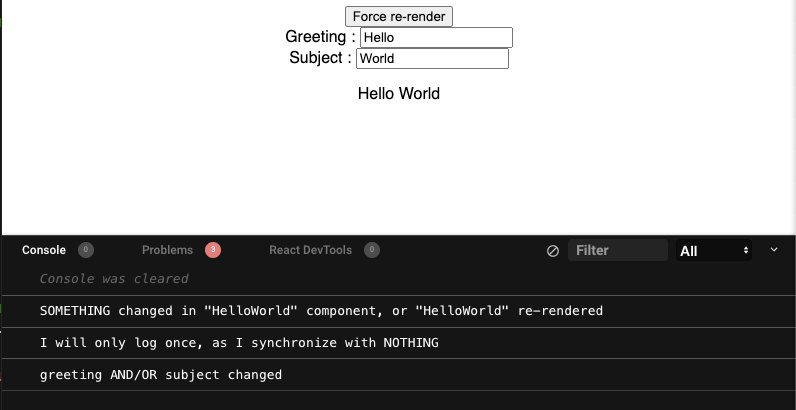
All hooks are run, because:
1. `useEffect` #1 ⇒ component rendered
2. `useEffect` #2 ⇒ *nothing* changed (first render)
3. `useEffect` #3 ⇒ *greeting* and *subject* changed because we initialized their states with the values 'Hello' and 'World'
What happens if the component re-renders, without any state change (thanks to the "Force re-render" button I've included)?
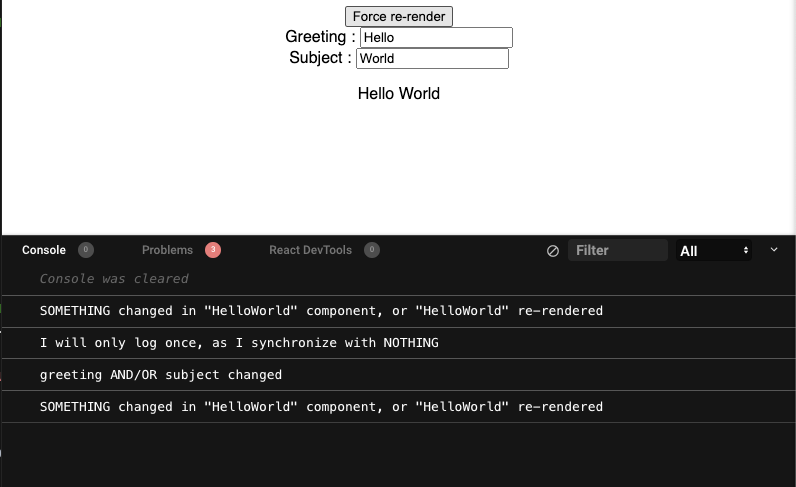
The only `useEffect` that was executed was our #1: because it has no dependencies, it gets executed every time *something* changes. The component re-rendered, this means something changed in the app (either a state in the component, or in the parent component), so this side effect is triggered.
Now if I type a single character in the greeting's input, let's see what happens (🧐 can you guess ?)
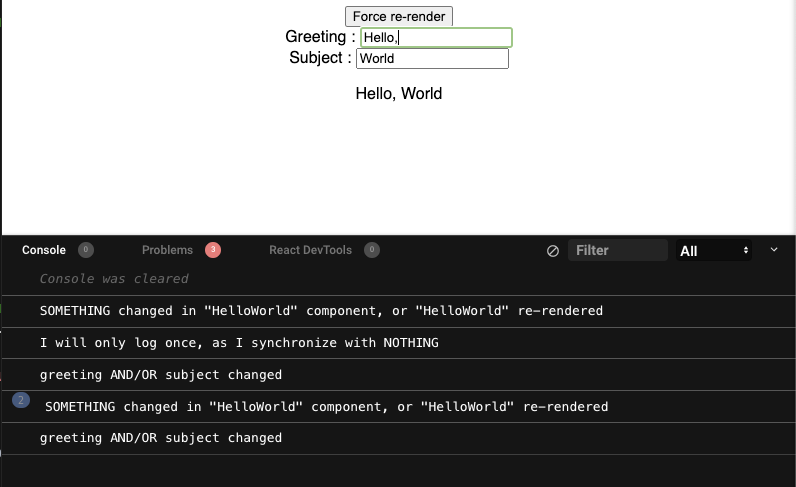
1. `useEffect` #1 got executed again because *something* changed
2. `useEffect` #3 got executed because `greeting` changed (I added a coma)
At this point, our useEffect #2 will never run again, it already has done its job, which was synchronized with *nothing*.
> 🤔 OK Yohann, this is all wonderful, `useEffect` has nothing to do with component lifecycle and all that, but I still want to know *when* this code is being executed!
I hear you. Your effects run (if one of their dependencies changed) *after* the render, DOM updates and screen painting phases, as you can see in [this great diagram by Donavon](http://github.com/donavon/hook-flow) :
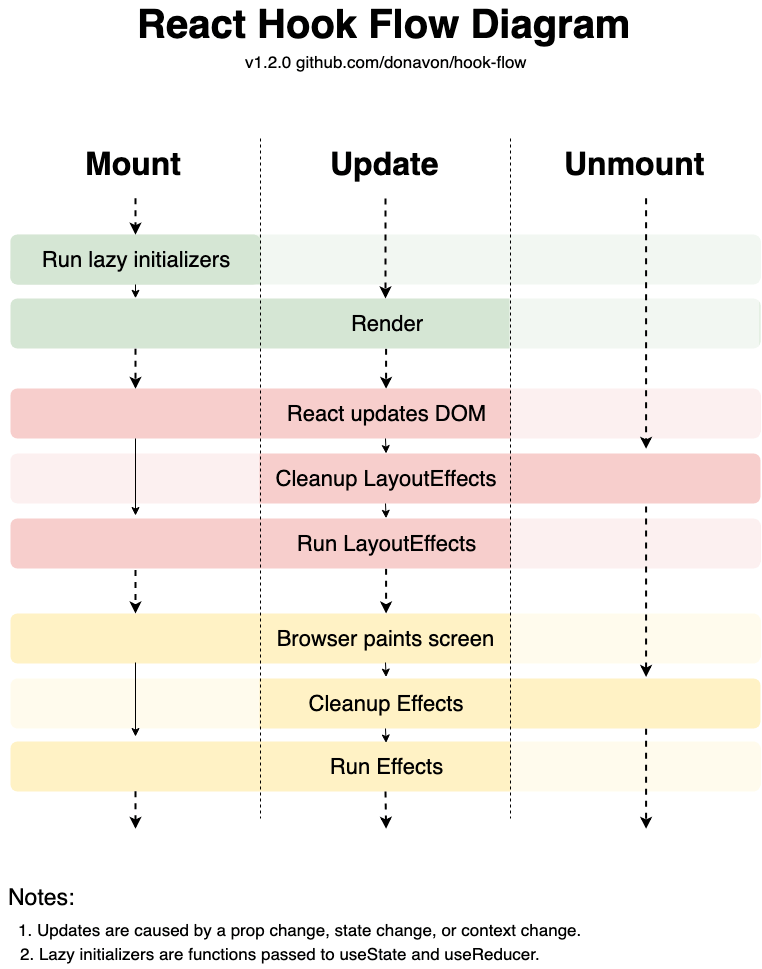
I won't go into more details about this hook flow here, but the main thing to take out from this is the quote from [Ryan Florence](https://twitter.com/ryanflorence/status/1125041041063665666) I mentioned earlier:
> The question is not "when does this effect run" the question is "with which state does this effect synchronize with"
Let that sink in, and you'll be fine 👌
## Managing dependencies
Now that we're on the same page, let's talk about something called "memoization". Sometimes, in your `useEffect`, you will need to include a function in your dependencies. Consider this:
```js
function Counter() {
const [count, setCount] = React.useState(10)
const alertCountOver = () => console.log('Count is too high !');
React.useEffect(() => {
console.log('running check on count value')
if (count > 100) {
alertCountOver()
}
// we wan't to run our check on the count value whenever count
// or alertCountOver change
}, [count, alertCountOver])
return (
Count = {count}
);
}
```
You might think that this is perfectly fine: whenever count change, we check its value, and if it is over 100 we call `alertCountOver`. Also, because we want to make sure that we call the up-to-date version of `alertCountOver`, we include it in the dependencies of our hook (also because eslint told you to do so).
Well, here's what's actually going to happen: every time the `Counter` component is going to re-render (because its parent re-render, for example), the `alertCountOver` function is going to be re-initialized. This means **it will change every render**, so our `useEffect` will be called, even if `count` didn't change 😤
This is because React relies on **value stability** for `useEffect` dependencies, and this is the problem that `React.useCallback` solves:
```js
const alertCountOver = React.useCallback(
() => console.log('Count is too high !'), // our function goes here
[] // this is the dependencies for the memoized version of our function
)
React.useEffect(() => {
console.log('running check on count value')
if (count > 100) {
alertCountOver()
}
// alertCountOver is now stable 🎉
}, [count, alertCountOver])
```
We still create a new function on every render, but if its dependencies didn't change since the previous render, React will give us back the exact same function (the "memoized" version). So now our `useEffect` will only be executed if one of the following condition is true:
- `count` value changed
- `alertCountOver` changed, which is not possible, regarding the fact that its dependencies are empty
Now if we wanted to include the count in the log message, we would also need to include `count` in the dependencies of the callback:
```js
const alertCountOver = React.useCallback(
() => console.log(`Count ${count} is too high !`),
[count]
)
```
This means that every time `count` changes, the memoized version of `alertCountOver` will be updated to reflect this change.
➡️ To wrap things up: as long as you include *something* in your dependencies, ask yourself "Is the value of *something* stable, or is it going to change every render ?". If the answer is yes, then you probably need to *memoize* it, otherwise your effect will run when you do not expect it to run.
> 📝 Note: sometimes, the easiest way is simply to move the function **outside** of your component (at the top of the file, or in another file). This way, it becomes stable by nature and there is no need to memorize it.
To read more about "memoization" and "value stability", check out [this great article](https://epicreact.dev/memoization-and-react).
## Good practices
I'll finish this article by mentioning a few good practices when it comes to using `useEffect` in your apps.
### #1 - If you must define a function for your effect to call, then do it inside the effect callback, not outside.
As practical as it is to use `useCallback` as we did before, it's not always a good idea. In fact, this adds more complexity in your codebase, and it's always good to avoid that as much as possible. **Every line of code that is executed comes with a cost**, and wrapping everything in `useCallback` is certainly not a good idea. `useCallback` is doing more work than just a simple function declaration. So, when it can be avoided, it should be.
That was precisely the case in our (*very contrivied*) previous example, and the solution is quite simple:
```jsx
React.useEffect(() => {
const alertCountOver = () => console.log('Count is too high !')
if (count > 100) {
alertCountOver()
}
}, [count])
```
No more need to include the function in our dependencies: because it's only being used by the `useEffect`, its place is **within** this `useEffect`. Of course, this example is still really stupid, but you get my point. In the real world, this would translate into something like this, for example:
```jsx
React.useEffect(() => {
const sendAlertToServer = async () => {
// Make a POST request to tell our backend that count exceeded 100
const res = await fetch("/countAlert", {
method: "POST",
body: JSON.stringify({ count }),
headers: {
"Content-type": "application/json; charset=UTF-8",
},
})
return res
}
if (count > 100) {
sendAlertToServer()
}
}, [count])
```
### #2 - Seperate concerns with multiple useEffect
I've seen people building *huuuuuge* `useEffect` in their components, to do all sorts of things in one place. Don't do that. You will just end up managing a giant list of dependencies, resulting in confusion, potential bugs, and headbanging on the wall to try and solve them. Remember that you can separate everything in multiple `useEffect`, each having its own dependencies. The code will not only be much more readable but way easier to maintain.
```js
// Use Effect - component mounted
React.useEffect(() => {
doSomethingOnMount()
checkSomething()
printSomething()
}, [])
// Use Effect - form related syncs
React.useEffect(() => {
validateForm()
submitForm()
resetPage()
, [formData])
// Use Effect - specific checks
React.useEffect() => {
if (value !== otherValue) {
doSomethingElse()
} else {
doSomethingMore()
}
}, [value, otherValue])
```
### #3 - Clean after yourself
Something I did not mention before: you can return a function in your `useEffect` hook, and React will execute this function when the component is being unmounted:
```jsx
React.useEffect(() => {
// Do something...
return () => {
// Clean up
}
}, [])
```
This is not only useful, but **strongly recommended** when doing things like attaching event listeners to the `window` object:
```jsx
React.useEffect(() => {
// Define the event listener
const scrollListener = () => {
console.log(window.pageYOffset)
}
// Attach it to the "scroll" event of the window
window.addEventListener('scroll', scrollListener);
return () => {
// Clean up phase: remove event listener from the window
window.removeEventListener('scroll', scrollListener);
}
}, [])
```
Trust me, this will save you the pain of debugging some really weird stuff going on in your app 😇
## Conclusion
Wow, you're still there? Congrats on taking the time to sharpen your understanding of this wonderful `useEffect` hook. I hope this post was useful to you somehow, and that it will save you some time when you will be building React Components in the future. React hooks are absolutely amazing but can definitely cause you some troubles if you don't understand what's behind them.
Feel free to let me know your thoughts about this, or to share any additional good practices that I didn't mention here. And in the meantime, don't forget to eat JavaScript for breakfast ☕️ and have a good one!